IMPARGO: Planner, Orders & Fleet Update – June 2023
Table of contents:
IMPARGO is continuously improving its platform to help logistics teams plan routes faster, manage orders more efficiently, and gain better fleet visibility. In this update, we're introducing new enhancements across three core areas: the IMPARGO Planner Module, the IMPARGO Orders Module, and the IMPARGO Fleet Module. Let's take a closer look at what's new.
IMPARGO Planner Module
Avoid Countries Feature
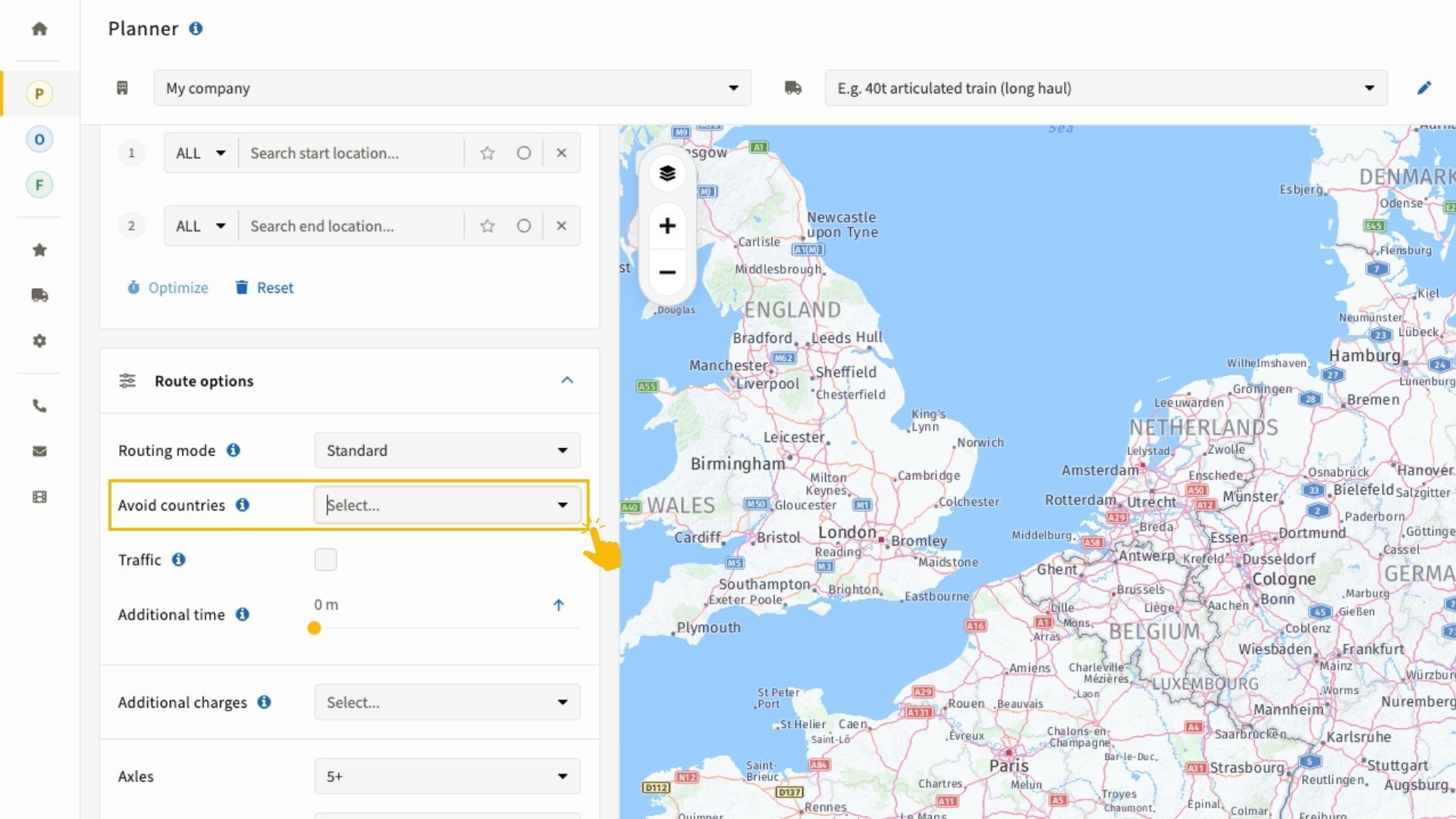
The Avoid Countries functionality in the IMPARGO Planner Module allows you to exclude specific countries from your truck route planning. By avoiding certain countries, you can optimize logistics operations, comply with regional regulations, and reduce potential route challenges. This gives dispatchers more flexibility and control when creating efficient transportation routes.
You can find the Avoid Countries option on the left side of the Planner under Route options (as shown in the image below).
Drag Routes Multiple Times (similar to Google Maps)
The enhanced drag-and-drop functionality in the IMPARGO Planner Module allows you to create as many viapoints as needed along your route—similar to how you would plan routes in Google Maps.
To add a viapoint, simply click on the route and drag it to the desired location. Each time you drag the route, a new viapoint is created.
To delete a viapoint, click on it with the left mouse button.
Please note: a viapoint is not added as a stop. If you want to add a stop in between two viapoints, use the right mouse button and select "Add in-between". This will insert a stop at that specific location.
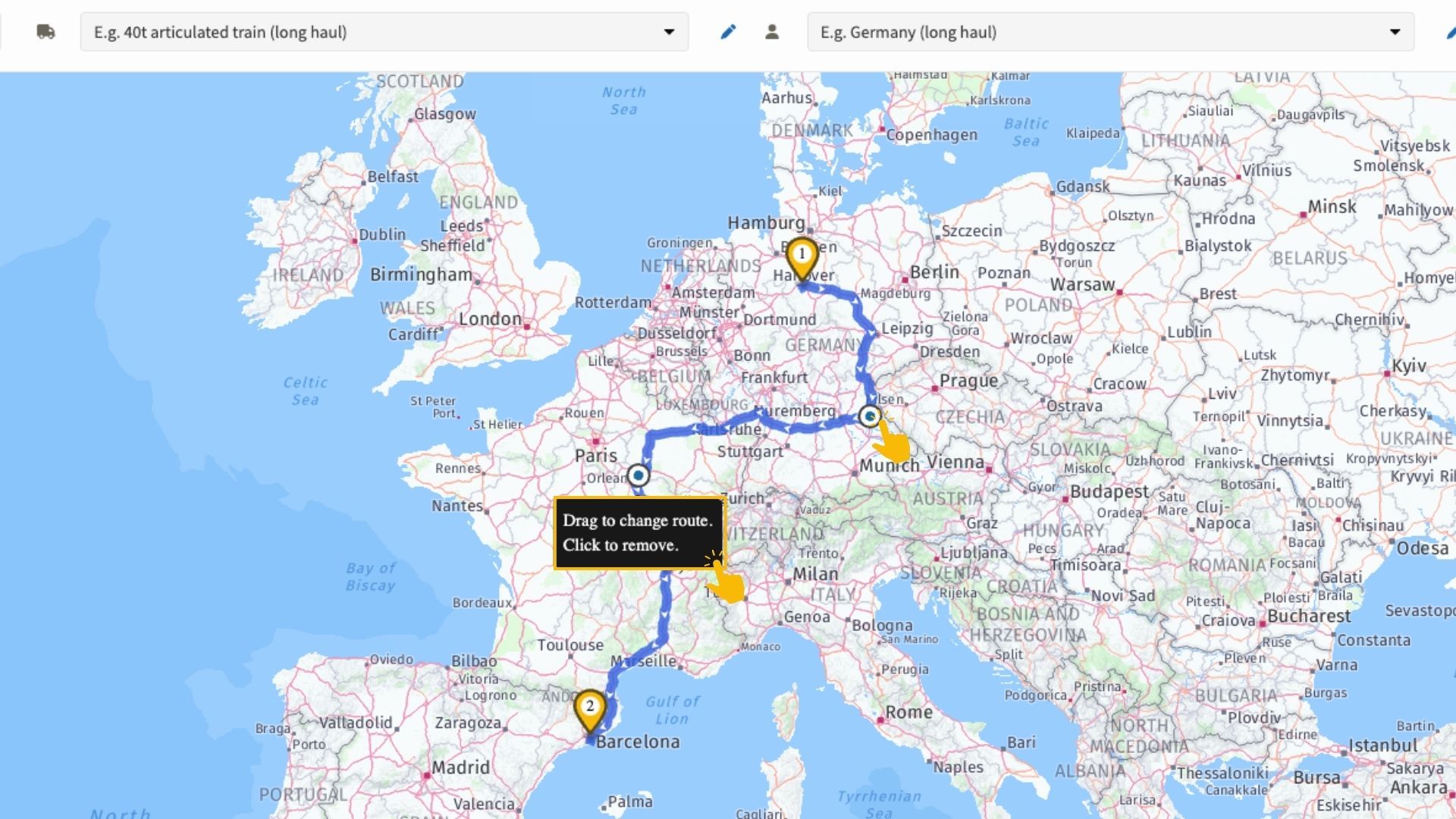
With this improvement, you can plan truck routes in IMPARGO with full flexibility and control. Adjust viapoints, change route direction, insert stops in between, or remove unnecessary points—ensuring your route planning remains optimized for efficiency and accuracy.
Default Additional Waiting Time Per Stop
IMPARGO now includes a global setting that allows you to add default waiting times to the additional stop data drawer. This preset duration is automatically added to each stop, helping account for loading and unloading times. You can still adjust the waiting time for individual stops via additional stop details in the Planner.
This feature is accessible in the main settings and saves time by reducing repetitive manual inputs.

IMPARGO Orders Module
Year Included in an auto-created Order Reference Number
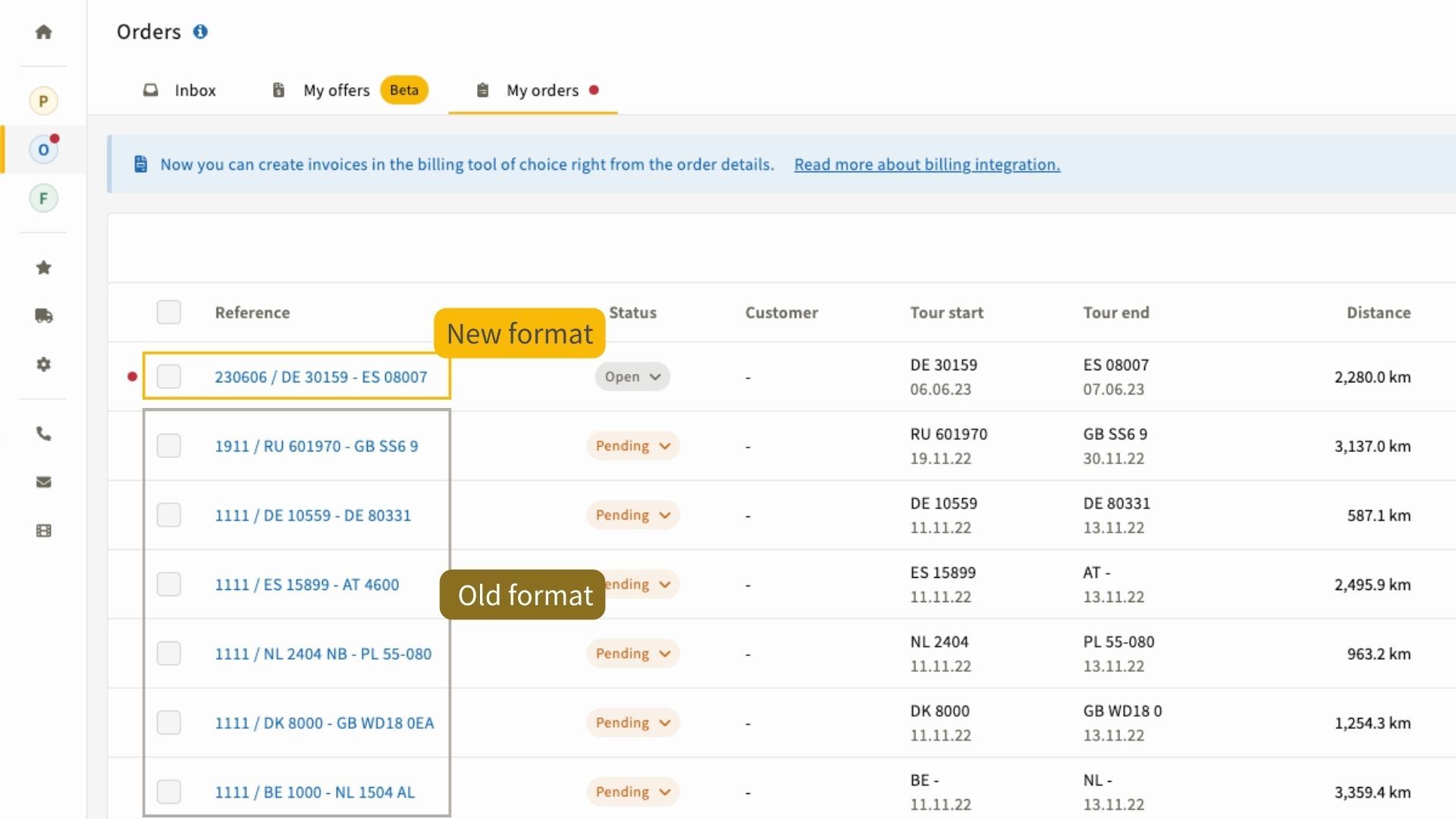
To improve sorting and organization inside the IMPARGO Orders Module, we updated the auto-generated reference number format. IMPARGO now includes the year in the order reference number, helping you quickly identify, categorize, and manage orders over time.
For example, the new format is: year/month/day/ DE 10117 - FR 75001. This makes it easier to retrieve historical orders and simplifies order management workflows.
IMPARGO Fleet Module
Improved Driver Identification
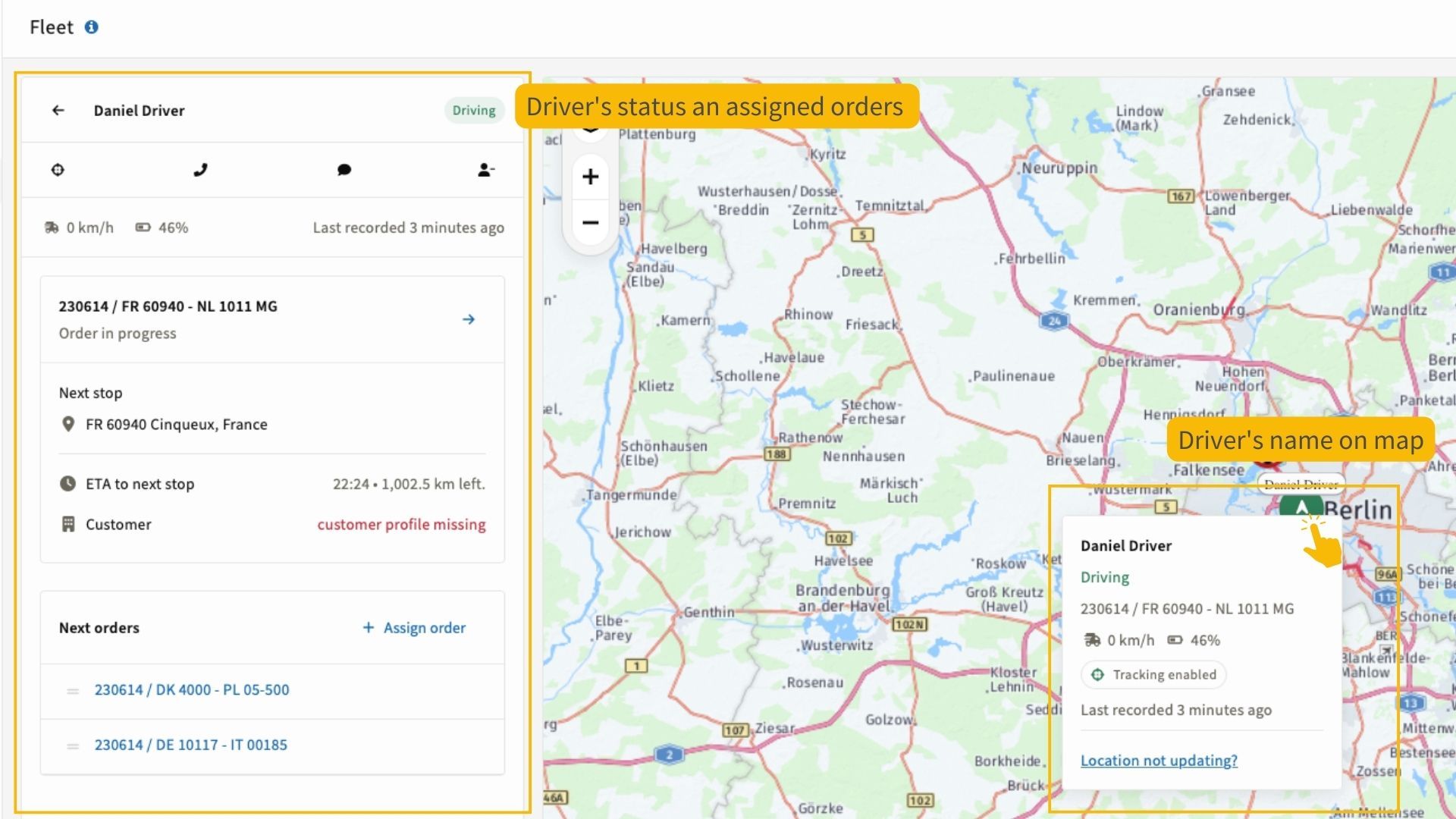
We made enhancements to the IMPARGO Fleet Module to improve driver identification and map visibility. You can now see driver name labels directly on the map, allowing faster recognition and easier coordination. Fleet information appears as a popup when hovering over the driver name.
When you click on a driver on the map, IMPARGO automatically highlights the selected driver on the left-side menu, ensuring faster navigation and quicker access to driver-specific details.
Reorder Assigned Orders
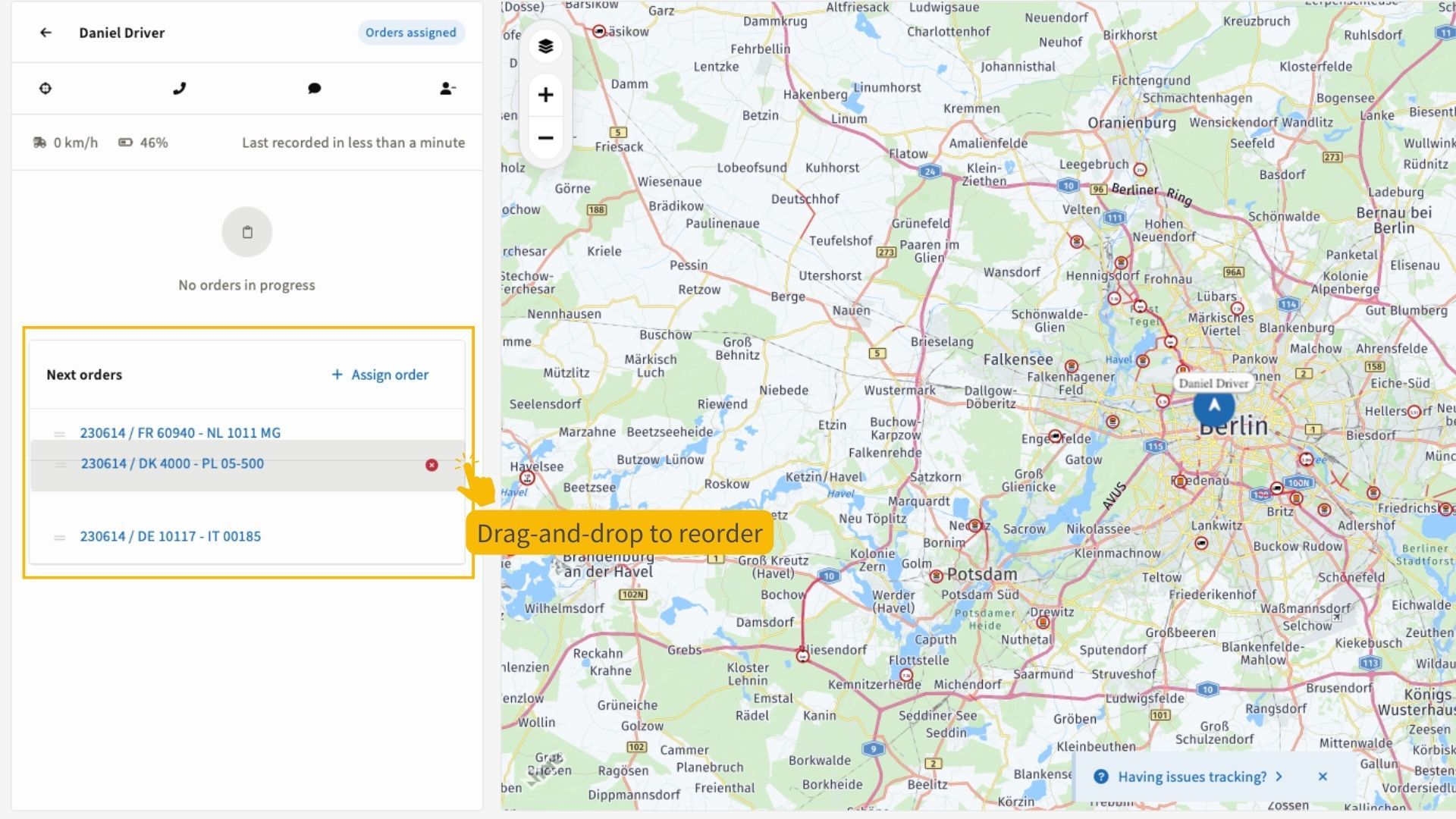
IMPARGO now enables you to reorder assigned orders directly in the Fleet view using simple drag-and-drop functionality. This makes it easier to adjust dispatch priorities and organize orders in the preferred sequence.
With these IMPARGO updates, we aim to provide improved workflows across the Planner Module, Orders Module, and Fleet Module. By continuously incorporating user feedback, we ensure IMPARGO helps logistics teams operate more efficiently, manage costs, and stay in control. Stay tuned for more improvements as we continue to evolve the platform.
We greatly value your feedback and suggestions for improving IMPARGO. Your input helps shape future updates, so please reach out to our team directly with any thoughts on how we can enhance our products and services. Thank you for helping us make IMPARGO even better!