How to Manage Bulk Transport in a TMS
If your fleet hauls cement, gravel, grain, fuel, milk, or any other bulk cargo across the EU, you've probably built a workaround stack over the years: a side spreadsheet for tonnes and litres, a WhatsApp thread for weighbridge readings, and a manual recalculation every time the planned load and the actual load don't match. That works: until volume grows, and then it doesn't.
This guide walks through how a transport management system (TMS) handles bulk transport end-to-end: automating EUR/t pricing, building a reusable product catalogue, capturing transported quantities during driver execution, and reusing recurring templates. We'll use IMPARGO's TMP® as the worked example because we just shipped this feature ourselves and have the dispatcher-side workflow on hand.
Bulk transport in a TMS: a quick definition
In freight terminology, a bulk load is any cargo measured by mass or volume rather than by piece or pallet: tonnes of cement, cubic metres of gravel, litres of fuel, or kilograms of grain. The defining characteristic is that the unit and the quantity change per order: you don't ship "one cement," you ship 24 tonnes or 18 m³ of it. In the UK and across DACH/BENELUX, this is often called bulk haulage: same concept, different label.
A bulk-transport-capable TMS handles three things a pallet-only TMS can't: it prices by the unit (EUR/t, EUR/m³, EUR/l) rather than per piece, it adjusts that price automatically when the actual transported quantity differs from the planned one, and it stores reusable product definitions so the same cement, gravel, or milk doesn't have to be rebuilt on every order.
Bulk transport types a TMS should handle
"Bulk transport" is an umbrella term. On the ground, dispatchers think in specific cargo types, and each one carries its own pricing unit, weighing reality, and billing quirk. Here is how the most common European bulk categories map onto the same EUR/t engine, automatic recalculation, and reusable catalogue described above.
Construction material transport (Baustofftransport)
Sand, gravel, crushed aggregate, and cement are the highest-frequency bulk category for regional hauliers. They are priced by the tonne, weighed at the quarry or builder's yard, and almost always come in a fraction over or under the planned figure. In a TMS, each material is a reusable catalogue product; the driver confirms the weighbridge reading and the order total recalculates against the EUR/t rate. Sand-and-gravel runs (Kiestransport) sit in the same category.
Silo transport (Silotransport)
Powdered and granular goods travel in pressure-discharge silo vehicles: cement, lime, flour, plastic granulate, animal feed. The cargo is sealed and invisible once loaded, so the weighbridge ticket and the recorded quantity are the only proof of what actually moved. Our dedicated silo transport solution covers the full feature set; the bulk-products workflow in this guide is what powers the quantity capture behind it.
Liquid bulk and tanker transport (Tanktransport)
Fuel, heating oil, milk, water, and liquid chemicals are priced by the litre or cubic metre and metered at both loading and discharge. Volumes drift with temperature and residue, so planned and delivered quantities rarely match to the litre. The same per-unit pricing and driver-side capture handle litres and m³ as cleanly as tonnes.
Grain and agricultural bulk transport (Getreidetransport)
Grain, feed, and fertiliser are strongly seasonal, weighed at the silo or mill, and sensitive to moisture-driven weight changes between field and store. Reusable catalogue products plus weighbridge capture keep the harvest-season order spike off the side spreadsheet.
Waste and recycling transport (Abfalltransport)
Disposal goods reverse the usual freight billing logic: the carrier is paid at the loading point and pays a gate fee at unloading. IMPARGO's disposal flag captures exactly that (cost at unloading, price at loading) so waste and recycling runs bill correctly without a manual workaround. For the wider picture, see the full bulk haulage solution.
The four pillars of bulk transport: dispatcher view


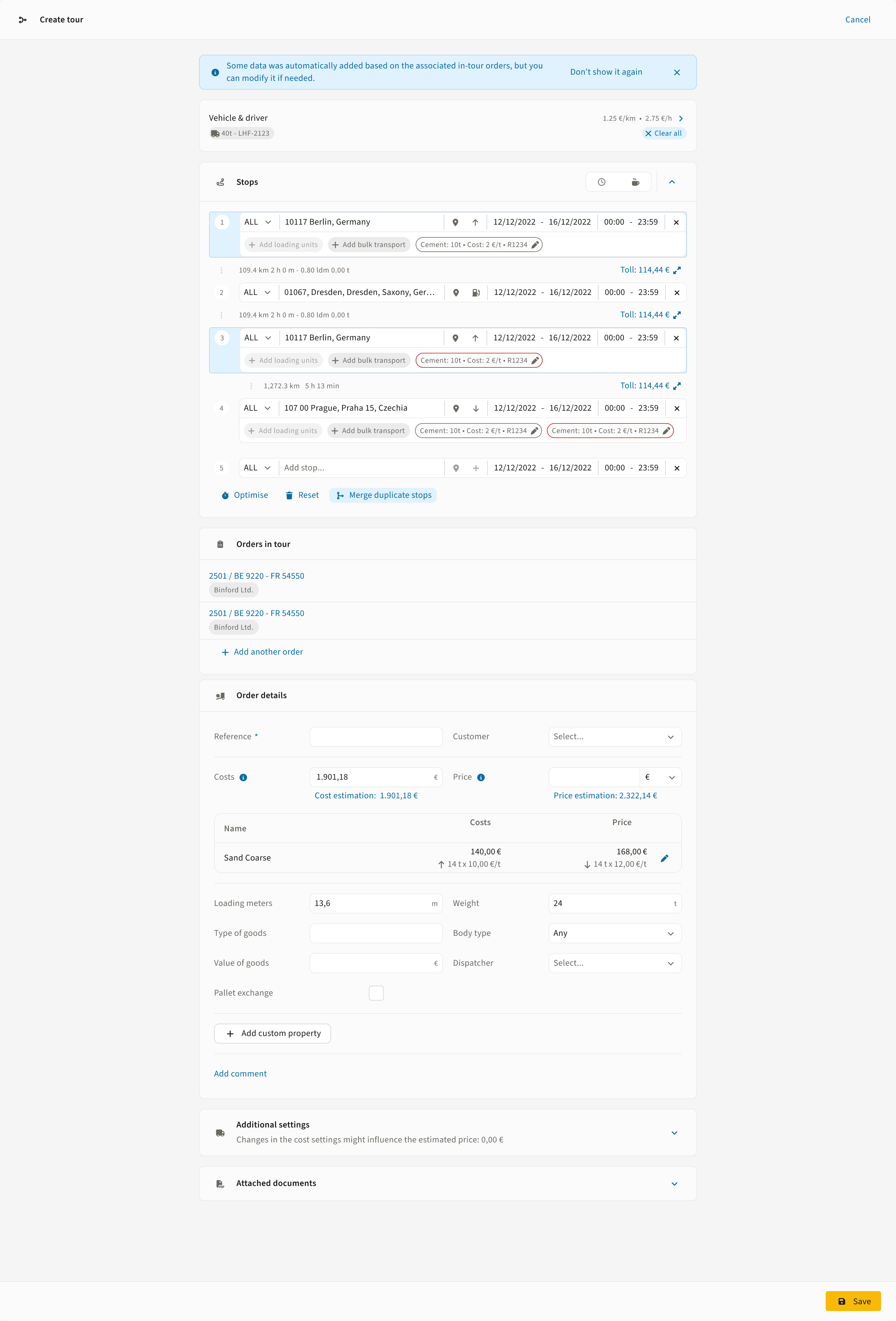
Below is the full bulk transport workflow split across the four feature pillars. Each one shows a short clip of the dispatcher and driver actions, with the detail underneath. Click any pillar to expand.


What dispatchers actually need: automatic recalculation
Most articles about bulk transport management stop at "you can attach a product to an order." The harder problem, and the one that costs real money, is what happens between dispatch and invoice when the planned quantity doesn't match the actual quantity. A lorry arrives at the silo with capacity for 24 tonnes; the weighbridge reads 23.6 tonnes; the customer is billed for what was actually delivered, not what was planned.
In IMPARGO, that recalculation happens automatically. The moment the driver enters 23.6 tonnes in the DriverApp, the order's price and cost update in the dispatcher view in real time: based on the per-unit EUR/t price you set when creating the order. There's no spreadsheet to reconcile at month-end; the numbers you see on the order page are the numbers that go to the invoice.

Cross-border bulk runs amplify every workflow problem
A surprising amount of EU bulk transport is cross-border: Belgian cement into the Ruhr, Dutch dairy collections into northern Germany, Polish fuel runs through Czechia. Cross-border bulk hauls amplify every problem a workaround stack creates: the dispatcher in Antwerp can't hear the weighbridge call from a German silo with three time zones of phone tag between them, and the invoice that arrives a fortnight later from a subcontractor in another country can't be reconciled against numbers that only live in a WhatsApp thread.
A TMS that holds the actual transported quantity, the supporting weighing ticket, and the EUR/t rate in one place removes the language and time-zone friction. The driver in any country files the same data in the same DriverApp, the price updates in the same view, and the subcontractor in another country sees the same record without anyone re-typing it across systems.

Workaround stack vs. IMPARGO TMP®: side-by-side
For dispatchers weighing whether to leave their current setup, the operational difference between a spreadsheet-plus-WhatsApp workaround and a TMS-managed bulk workflow comes down to where the data lives.
When does a TMS-managed bulk workflow pay for itself?
The break-even line depends on order volume more than load type. For a fleet doing five to ten bulk orders a week, the workaround stack (spreadsheets + chat threads) is usually faster than learning a new system. Above 20 orders a week, the workaround starts costing more than the TMS, typically in three places:
Driver phone time. Every weighbridge call that becomes a DriverApp update saves about 90 seconds per stop. Across a fleet of 15 lorries doing four stops a day, that's an hour of dispatcher time recovered daily. With Mobility Package driver-hour rules tightening the schedule across the EU, that hour matters more every year.
Month-end reconciliation. Bulk orders with quantity adjustments are the biggest source of invoice disputes in EU road freight. A TMS that holds actual quantities + supporting PODs against the original order removes the back-and-forth at billing, and the cross-border versions of this dispute are the most expensive to resolve.
Recurring run setup. A weekly cement run from Antwerp to Köln rebuilt from scratch every Monday eats roughly 15 minutes per route. Templates collapse that to seconds, and the EUR/t pricing logic stays consistent: no "we charged 87 €/t last month and 92 €/t this month because someone retyped it" surprises.
Five questions to ask any bulk-transport TMS
If you're evaluating systems, the questions worth asking:
1. Does it support all three product types? Solid, liquid, and gas, and can it handle disposal billing (cost at loading, price at unloading)? Most platforms manage solids well; fewer handle liquids without forcing tonnage equivalents; very few handle the disposal-flow billing correctly out of the box.
2. Does the driver update sync back automatically? If the driver app exists but the data flows by email or manual upload, you've just replaced one workaround with another. Real-time sync with automatic price recalculation is the test.
3. Are templates first-class? A TMS that lets you copy an order is helpful. One that lets you save a parameterised template (with product types, EUR/t pricing logic, stop sequences) is operationally different.
4. Can you build your own catalogue? Off-the-shelf product types cover 80% of cargo. The non-standard 20% (niche chemicals, regional aggregates, customer-specific product names) is where teams burn hours rebuilding the same product on every order. A custom catalogue removes that work.
5. Is it built for European bulk haulage? A US-designed TMS will price in short tons, miss EU regulatory hooks (Mobility Package, Eurovignette, country-by-country toll integration), and route in miles. For EU bulk operations, a TMS built on European data and rules is operationally closer to what your dispatchers and drivers actually do every day.