Truck Fleet Tracking: Real-Time Visibility for Dispatchers
Most carriers looking for "a GPS tracker for trucks" do not actually have a hardware problem. If you run a telematics box (Webfleet, Trimble, or similar) or your drivers carry a smartphone, the GPS signal already exists. The real gap is real-time fleet tracking that puts every truck, ETA, and status on one live map, so dispatchers stop calling drivers to ask "where are you?" and customers stop calling you. This article explains what real-time truck tracking actually requires and how to get fleet visibility without buying new hardware for every vehicle.
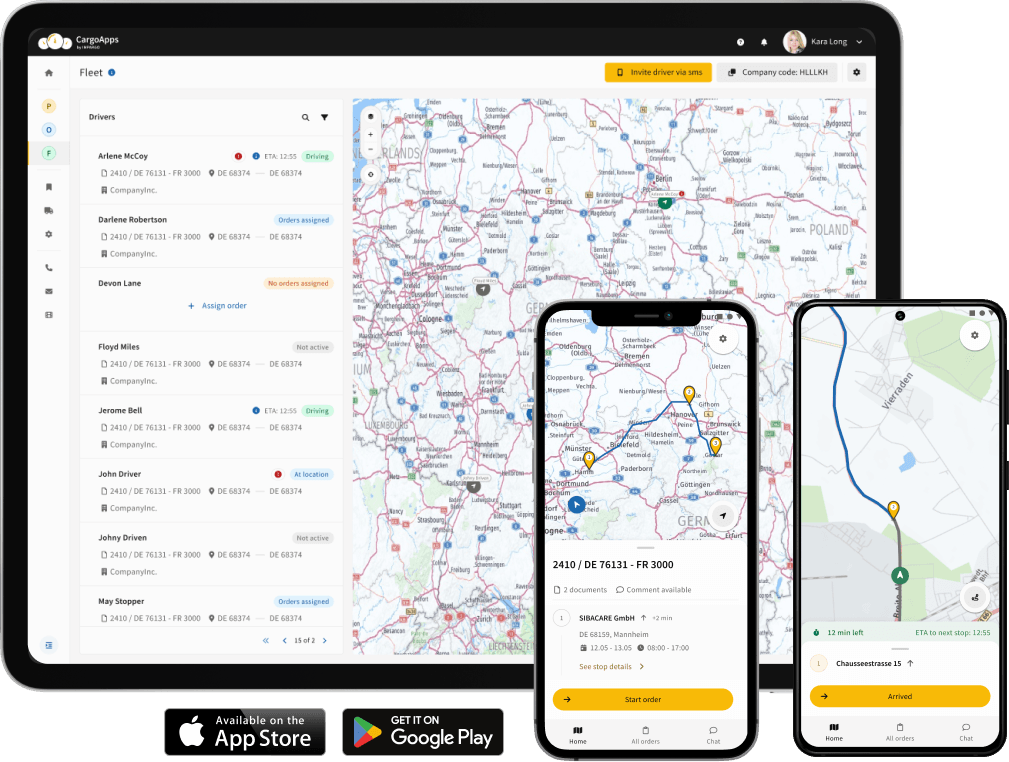
What Real-Time Truck Tracking Actually Requires
Live fleet tracking needs three things: a position source, a system that collects positions from every truck, and a view that turns them into decisions. Most carriers already have the first one.
- Position source: an existing telematics unit in the cab, or the driver's phone running the DriverApp.
- Collection: a system that pulls positions from mixed sources (different telematics brands, different trucks) into one place.
- The view: a live map with ETAs, status, and alerts, plus a tracking link you can share with the customer.
The Problem Is Not the Tracker, It Is the Silos
A carrier with 20 trucks often has GPS data in three places: one brand of telematics on the newer trucks, another on the older ones, and nothing on the subcontractor's vehicles. Each system has its own login. The dispatcher ends up phoning drivers anyway, because no single screen shows the whole fleet. Buying more trackers does not fix that. Connecting the sources you already have into one map does.
This is where fleet telematics integration earns its place: existing systems feed one live view, so a "where is my shipment?" question is answered by looking, not calling.

What Good Fleet Visibility Looks Like
Once positions are in one place, real-time fleet visibility gives the dispatcher:
- A live map of every truck, whatever telematics brand it runs.
- Accurate ETAs, so delays are seen before the customer notices.
- Automatic alerts for stops, delays, and route deviations, instead of manual checking.
- Customer tracking links and status updates, which cut inbound "where is it?" calls and raise service quality.
No Telematics Box? Use the DriverApp
For trucks without a telematics unit, or for subcontractors you do not equip, the DriverApp turns the driver's phone into the position source. The driver also gets the planned tour and truck navigation, sends status and proof of delivery digitally, and stays reachable through in-app messages instead of phone calls. It is the fastest way to bring a mixed or partly subcontracted fleet onto one tracking view.
A Note on Data and Privacy
Location data is personal data under the GDPR, so store and use it accordingly: track for legitimate operational purposes, keep access controlled, and be transparent with drivers about what is recorded. A tracking setup built into your TMS keeps that data in one governed place rather than scattered across separate apps and exports.
See Your Whole Fleet on One Live Map
FAQ: Real-Time Truck Fleet Tracking
Do I need a GPS tracker for every truck?
Usually not. If a truck has a telematics unit or the driver runs the DriverApp, the position is already available. The task is collecting those positions into one live view, not adding hardware.
Can I track different telematics brands together?
Yes. Fleet telematics integration pulls positions from mixed systems into one map, so the whole fleet is visible regardless of the brand in each cab.
How does real-time tracking cut customer calls?
Shareable tracking links and automatic status updates let customers see the ETA themselves, so fewer of them call to ask where the shipment is.